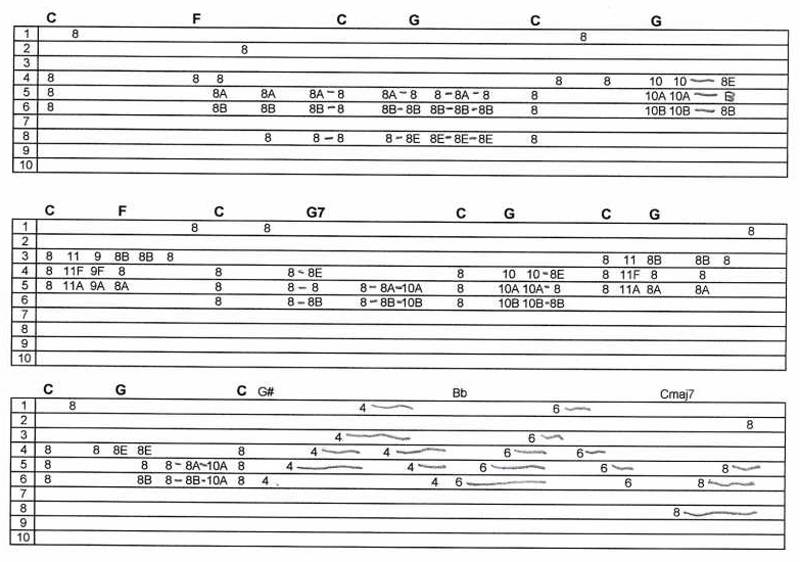
O Holy Night - E9th Tab

Written music for steel guitar

Moderator: Ricky Davis

User avatar
Greg Cutshaw
Posts: 6818
Joined: 17 Nov 1998 1:01 am
Location: Corry, PA, USA
State/Province: -
Country: United States

O Holy Night - E9th Tab

Post by Greg Cutshaw »

This tune is played one time through on C6 and then once on E9. Included below is the E9th tab. I posted the C6th Tab in a previous thread.

For those whose printer don't have a property setting to print the whole tab on one sheet neatly, I added the tab split into 2 parts below. In most cases, if you right click the tab and select "print picture" you will get a one page print.

Click here to hear the complete song.

Click here to hear the backup track. Right click either file to save to your computer.

Image


Image


Image


Greg<font size="1" color="#8e236b"><p align="center">[This message was edited by Greg Cutshaw on 15 December 2006 at 06:12 AM.]</p></FONT>
Last edited by Greg Cutshaw on 29 Dec 2006 10:05 pm, edited 3 times in total.
Thom Beeman
Posts: 330
Joined: 3 Apr 2006 12:01 am
Location: California, USA, R.I.P.
State/Province: -
Country: United States

Post by Thom Beeman »

Beautiful Greg. Thank you.

------------------
thomb@steelseat.com
"If you're not on our seat, you paid too much"
User avatar
Greg Cutshaw
Posts: 6818
Joined: 17 Nov 1998 1:01 am
Location: Corry, PA, USA
State/Province: -
Country: United States

Post by Greg Cutshaw »

Thom, I have to check to see what brand of seat I played that on. Does it affect the sound Image ?

Greg
J Hill
Posts: 626
Joined: 8 Oct 2004 12:01 am
Location: Colorado, USA
State/Province: Colorado
Country: United States

Post by J Hill »

Greg,

Thanks so much for the tab! But I'm having a little trouble with the printout. Is there another way? When I right-clicked 'print picture' I only got 5 sections down and couldn't get the rest to print. When I did a straightforward printout it printed 3 pages with the right side cut off. I hope you can help, and thanks again!
John Lockney
Posts: 357
Joined: 13 Dec 2004 1:01 am
Location: New Market, Maryland, USA
State/Province: Maryland
Country: United States

Post by John Lockney »

I usually right-click on the tab, copy, and then paste into Word. That way you can stretch the image, change the margins and see what it will look like before it prints.


User avatar
Greg Cutshaw
Posts: 6818
Joined: 17 Nov 1998 1:01 am
Location: Corry, PA, USA
State/Province: -
Country: United States

Post by Greg Cutshaw »

I have printed these tabs a bunch of different ways but your suggestion, John, is awesome! I had Word sitting here on my desktop and never thought to use it for that. You could also cut and paste the comments and explanations as desired and have everything in one place.

Greg
J Hill
Posts: 626
Joined: 8 Oct 2004 12:01 am
Location: Colorado, USA
State/Province: Colorado
Country: United States

Post by J Hill »

Thanks for the tip. I'm getting Word installed in a few days and I'll try that! Image