Jody Cameron tuning MA9 is great!
Moderator: Dave Mudgett

-
Richard Sinkler

- Posts: 17878
- Joined: 15 Aug 1998 12:01 am
- Location: Missoula
- State/Province: Montana
- Country: United States
Doesn't look like it. Unless I M missing something.Jim Cohen wrote:Is there a way to add these tunings to a StroboFlip?
Carter D10 8p/7k, Dekley S10 3p/4k C6 setup, Regal RD40 Dobro (D tuning), Recording King Professional Dobro (G tuning), NV400, NV112, Ibanez Gio guitar, Epiphone SG Special (open G slide and regular G tuning guitar) .
Playing for 55 years and still counting.
Playing for 55 years and still counting.
-
Dave Meis

- Posts: 1144
- Joined: 8 Jan 2015 7:46 pm
- Location: Olympic Peninsula, Washington, USA
- State/Province: Washington
- Country: United States
Like Dick Wood above, I loaded the MA9, couldn't find it, tried re-loading it, it told me I already had it, went to Configure Mode, and it shows 3 dashes (---) indicating I have NO user configured presets , scrolled through the factory settings (twice) and no MA9.. can anyone see what I missed? TIA, dave
-
Chris Robbins
- Posts: 267
- Joined: 23 Jul 2000 12:01 am
- Location: Biggsville Illinois
- State/Province: Illinois
- Country: United States
Ma9
I downloaded it just to discover all the factory presets went away. Went back in and had to manually pick what presets I wanted so I picked all the pedal steel presets along with the MA9 preset and downloaded them back into my tuner, If you want all the factory presets back just hit the default and it will put everything back.
-
Dave Meis
- Posts: 1144
- Joined: 8 Jan 2015 7:46 pm
- Location: Olympic Peninsula, Washington, USA
- State/Province: Washington
- Country: United States
Chris, there’s 2 sets of presets accessible from the configuration mode that you access by pushing the power and mode buttons at the same time. From there, you can select FDR for factory presets or USR for user presets. If you don’t have any user presets (like MA9), it’ll show 3 dashes (———). It looks like they’re gone, but they’re in another bank.
-
Dave Manion
- Posts: 239
- Joined: 22 Aug 2007 11:22 am
- Location: Boise, Idaho, USA
- State/Province: Idaho
- Country: United States
-
John Norris

- Posts: 147
- Joined: 27 Jul 2005 12:01 am
- Location: Peterson Strobe Tuners, Illinois, USA
- State/Province: Illinois
- Country: United States
They work for any Peterson hardware tuner which has USB connectivity.Dave Manion wrote:Do these downloads work for the Peterson Stomp Classic? They all seem to be labeled for the Strobo Plus HD...
Currently, that includes the Stomp Classic, StroboPLUS HD and StroboClip HD.
John Norris
Peterson Strobe Tuners
- Celebrating almost 80 Years of Tuning Products in 2026!
Peterson Strobe Tuners
- Celebrating almost 80 Years of Tuning Products in 2026!
-
Dave Manion
- Posts: 239
- Joined: 22 Aug 2007 11:22 am
- Location: Boise, Idaho, USA
- State/Province: Idaho
- Country: United States
-
Dick Wood

- Posts: 3078
- Joined: 2 May 2005 12:01 am
- Location: Springtown Texas, USA
- State/Province: Texas
- Country: United States
-
Mickey Adams

- Posts: 5152
- Joined: 26 Jan 2004 1:01 am
- Location: Bandera Texas
- State/Province: Texas
- Country: United States
Most of the issues i see here are related to the registration process...your unit MUST be in their database in order to connect, and you must verify that is says so..You may also use the refresh button similar to to a webpage refresh...I clear my tuners regularly, and only load what i need..
CLear all of your presets and all sweeteners onboard the unit..(unless you like scrolling)..
Start from the left and build into the unit all the tunings that you want available.
Now move the tunings you want in PRESET, IN ORDER...to The PRESET COLUMN, and hit UPDATE DEVICE..Generally, if you DONT See UPDATE DEVICE, your unit is not recognized, connected, or being modified..
Once the unit is updated unplug it...Turn the unit on, and set the default tuning for startup...Now all you have to do is hit the far right button to scroll through presets in order..you should only have to scroll surf for things that are NOT in your preset list..
CLear all of your presets and all sweeteners onboard the unit..(unless you like scrolling)..
Start from the left and build into the unit all the tunings that you want available.
Now move the tunings you want in PRESET, IN ORDER...to The PRESET COLUMN, and hit UPDATE DEVICE..Generally, if you DONT See UPDATE DEVICE, your unit is not recognized, connected, or being modified..
Once the unit is updated unplug it...Turn the unit on, and set the default tuning for startup...Now all you have to do is hit the far right button to scroll through presets in order..you should only have to scroll surf for things that are NOT in your preset list..
ARTIST RELATIONS: MSA GUITARS
2017 MSA LEGEND XL D10, S10, Studio Pro S12 EXE9
Mullen G2, Rittenberry S10, Infinity D10, Zumsteel 8+9
Anderson, Buscarino, Fender, Roman Guitars, Sarno Octal, Revelation Preamps, BJS BARS, Lots of Blackface Fenders!
2017 MSA LEGEND XL D10, S10, Studio Pro S12 EXE9
Mullen G2, Rittenberry S10, Infinity D10, Zumsteel 8+9
Anderson, Buscarino, Fender, Roman Guitars, Sarno Octal, Revelation Preamps, BJS BARS, Lots of Blackface Fenders!
-
Dale Rottacker

- Posts: 4137
- Joined: 3 Aug 2010 6:49 pm
- Location: Walla Walla
- State/Province: Washington
- Country: United States
Did this a few days ago... once it recognized my StroboPlus, voila there it was MA9... And it works perfectlyMickey Adams wrote:Most of the issues i see here are related to the registration process...your unit MUST be in their database in order to connect, and you must verify that is says so..You may also use the refresh button similar to to a webpage refresh...I clear my tuners regularly, and only load what i need..
CLear all of your presets and all sweeteners onboard the unit..(unless you like scrolling)..
Start from the left and build into the unit all the tunings that you want available.
Now move the tunings you want in PRESET, IN ORDER...to The PRESET COLUMN, and hit UPDATE DEVICE..Generally, if you DONT See UPDATE DEVICE, your unit is not recognized, connected, or being modified..
Once the unit is updated unplug it...Turn the unit on, and set the default tuning for startup...Now all you have to do is hit the far right button to scroll through presets in order..you should only have to scroll surf for things that are NOT in your preset list..
Dale Rottacker, Steelinatune™
https://www.youtube.com/@steelinatune
https://msapedalsteels.com
http://rittenberrysteelguitars.com
https://www.youtube.com/@steelinatune
https://msapedalsteels.com
http://rittenberrysteelguitars.com
-
Jim Morris
- Posts: 517
- Joined: 18 Jul 2017 7:32 am
- Location: Cincinnati Ohio, USA
- State/Province: Ohio
- Country: United States
-
Mickey Adams
- Posts: 5152
- Joined: 26 Jan 2004 1:01 am
- Location: Bandera Texas
- State/Province: Texas
- Country: United States
I do not have them written anywhere that I can find..
however, the data should be clearly visible in the app, if you can get into the editing mode
however, the data should be clearly visible in the app, if you can get into the editing mode
ARTIST RELATIONS: MSA GUITARS
2017 MSA LEGEND XL D10, S10, Studio Pro S12 EXE9
Mullen G2, Rittenberry S10, Infinity D10, Zumsteel 8+9
Anderson, Buscarino, Fender, Roman Guitars, Sarno Octal, Revelation Preamps, BJS BARS, Lots of Blackface Fenders!
2017 MSA LEGEND XL D10, S10, Studio Pro S12 EXE9
Mullen G2, Rittenberry S10, Infinity D10, Zumsteel 8+9
Anderson, Buscarino, Fender, Roman Guitars, Sarno Octal, Revelation Preamps, BJS BARS, Lots of Blackface Fenders!
-
Jim Morris
- Posts: 517
- Joined: 18 Jul 2017 7:32 am
- Location: Cincinnati Ohio, USA
- State/Province: Ohio
- Country: United States
-
Marco Schouten

- Posts: 1967
- Joined: 30 Mar 2000 1:01 am
- Location: Amsterdam, The Netherlands
- State/Province: -
- Country: United States
You would have to type in the values manually. I did it for the settings that I use for my guitar.Jim Cohen wrote:Is there a way to add these tunings to a StroboFlip?
I use the settings calculated from this site: http://www.lozach.com/tuning.php?
----------------------------------
JCH SD-10 with BL XR-16 pickup, Sho-Bud Volume Pedal, Evidence Audio Lyric HG cables, Quilter Steelaire combo
JCH SD-10 with BL XR-16 pickup, Sho-Bud Volume Pedal, Evidence Audio Lyric HG cables, Quilter Steelaire combo
-
Mark S. Miller
- Posts: 135
- Joined: 13 Aug 2001 12:01 am
- Location: Depew, NY, USA
- State/Province: -
- Country: United States
Since I downloaded The MA9 I have never looked back I come from the era of Jeff Newman and was about a 2 year player when he came out with his 442 setting. For years I struggle with all the off set turnings that were out there I was told all the time check you turning and now do believe I played out of tune for many years. At some point I realize I got to tune this guitar and I did by ear and chimes it help a lot but never did feel comfortable on a band stage with all the noise going on. To make a long story short when the MA) came along I downloaded it and love it. I go to a gig set up tune my guitar and never look back I think it is the best turning preset out there My main guitars are Williams and Excel which I think is important to any turning you use.
-
Greg Forsyth
- Posts: 467
- Joined: 3 Apr 2020 1:05 pm
- Location: Colorado, USA
- State/Province: Colorado
- Country: United States
-
Steve Mueller
- Posts: 555
- Joined: 18 Nov 2010 3:19 pm
- Location: Cincinnati, Ohio, USA
- State/Province: Ohio
- Country: United States
-
Lee Baucum

- Posts: 10859
- Joined: 11 Apr 1999 12:01 am
- Location: McAllen, Texas (Extreme South) The Final Frontier
- State/Province: Texas
- Country: United States
-
John Sluszny
- Posts: 2308
- Joined: 9 Apr 2001 12:01 am
- Location: Brussels, Belgium
- State/Province: -
- Country: Belgium
-
John Norris
- Posts: 147
- Joined: 27 Jul 2005 12:01 am
- Location: Peterson Strobe Tuners, Illinois, USA
- State/Province: Illinois
- Country: United States
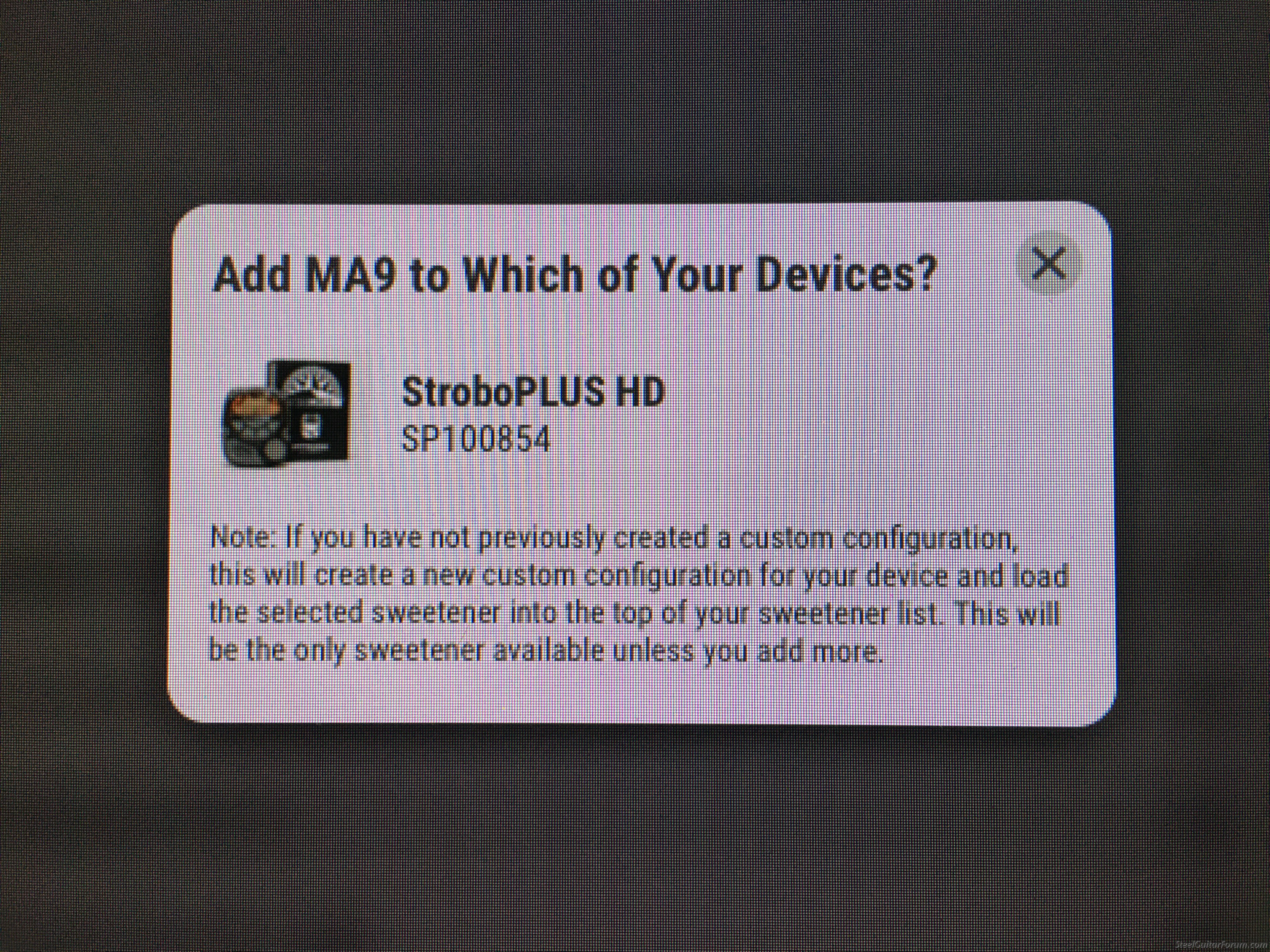
Hi John,John Sluszny wrote:I’d love to get the MA9 tuning but I’m afraid of this !
See photo here under. See note.
Help please.
Thanks !
You never lose your factory Sweeteners, the factory settings cannot be erased no matter what you do.
They just "live" in a different area of the tuner's memory when you load a custom Sweetener into the StroboPLUS.
The tuner stores custom Sweeteners in the user configuration section, and factory Sweeteners in the Factory section.
If there are only a few custom Sweeteners in the User configuration section, that's all you will see, initially.
However:
You can swap over and back between the user and the factory configuration pretty easily on the tuner itself (see below).
But it's much more convenient to populate the tuner's User configuration with *all* the Sweeteners you need (factory or custom or a mix of both), omitting the ones you don't need.
That way everything is on one Sweetener list and more convenient, we call this a custom configuration as opposed to the factory configuration.
This user configuration is also stored on the Peterson server, should you ever acquire another Peterson, you can load an identical configuration onto that tuner too, so you can never lose anything, even custom settings.
How to swap configurations:
The StroboPLUS HD has two modes, FDR (factory default settings) and USR (custom user settings + selected factory settings if desired).
While the unit is powered on, hold down the power button and then the mode button together momentarily (power button slightly ahead of mode)
You'll see a screen with a large C and 3 characters in the upper right corner. Press in on the dial. 3 characters will flash.
The characters will either show USR or FDR.
When either is flashing, rotate the dial to select the other.
I would advise you to configure your tuner, selecting all the Sweeteners and settings you want to be able to quickly and conveniently recall and load that into the tuner.
The configuration page is here:
https://www.petersontuners.com/configure/
John Norris
Peterson Strobe Tuners
- Celebrating almost 80 Years of Tuning Products in 2026!
Peterson Strobe Tuners
- Celebrating almost 80 Years of Tuning Products in 2026!
-
John Sluszny
- Posts: 2308
- Joined: 9 Apr 2001 12:01 am
- Location: Brussels, Belgium
- State/Province: -
- Country: Belgium


 Thanks !
-
Greg Milton

- Posts: 276
- Joined: 29 May 2009 7:03 am
- Location: Benalla, Australia
- State/Province: -
- Country: United States
-
Greg Forsyth
- Posts: 467
- Joined: 3 Apr 2020 1:05 pm
- Location: Colorado, USA
- State/Province: Colorado
- Country: United States
Mickey,Mickey Adams wrote:I do not have them written anywhere that I can find..
however, the data should be clearly visible in the app, if you can get into the editing mode
You don't have the settings written.... sound more like you not wanting to share and are steering folks into buying an expensive tuner just so they can test your tuning. Seems to me like a marketing ploy.
-
Andy Henriksen
- Posts: 481
- Joined: 27 Apr 2012 8:59 am
- Location: Michigan, USA
- State/Province: Michigan
- Country: United States
That's quite an accusation - Mickey's been a member here for almost 17 years, has over 5000 posts contributing selflessly to the steel guitar community. I think you'd be hard-pressed to find anyone who has anything bad to say about him. Maybe you should take him at his word, instead of assuming the worst.Greg Forsyth wrote:Mickey,Mickey Adams wrote:I do not have them written anywhere that I can find..
however, the data should be clearly visible in the app, if you can get into the editing mode
You don't have the settings written.... sound more like you not wanting to share and are steering folks into buying an expensive tuner just so they can test your tuning. Seems to me like a marketing ploy.