Well, right after a Vista update on my laptop, my external USB hard drive stopped working. I wish Micros#!t would get there act together and hire some decent programmers who don't screw things up worse every time they try to fix some previous problem that their inept programmers screwed up.
Anyway, after the update, my laptop no longer sees the files on the drive. If I go into the sytem information, it does list the drive but says it needs to be formatted now. Is there a way to salvage this. I have a lot of stuff on there.
This is what I see when I go to system information. The drive in question is seen as the "D" drive.
Is there any way to get this disk to work without having to reformat it. Every time I try to access it, it says I have to format it.
Last edited by Richard Sinkler on 5 Mar 2011 11:20 am, edited 1 time in total.
Carter D10 8p/7k, Dekley S10 3p/4k C6 setup, Regal RD40 Dobro (D tuning), Recording King Professional Dobro (G tuning), NV400, NV112, Ibanez Gio guitar, Epiphone SG Special (open G slide and regular G tuning guitar) .
You could also try logging in with another account and see if it sees it. If it does, then there might be a problem with your main account. If it doesn't, you're back to square one, or it might be a hardware issue.
I don't have access to another computer to try. I have done the unplug - replug routine. I will try the other user thing and see if that works. The drive is less that a year old. It seems as though the FAT tables and the - I forget what the other thing that gets put on when you format - got damaged somehow.
I have seen this happen in the past with internal drives, but had the software to fix the disk drives (if fixable). I don't have access to that now.
Carter D10 8p/7k, Dekley S10 3p/4k C6 setup, Regal RD40 Dobro (D tuning), Recording King Professional Dobro (G tuning), NV400, NV112, Ibanez Gio guitar, Epiphone SG Special (open G slide and regular G tuning guitar) .
I know David, but that is not an option. I have too much Winders software that I would have to replace if I went to a Mac.
Carter D10 8p/7k, Dekley S10 3p/4k C6 setup, Regal RD40 Dobro (D tuning), Recording King Professional Dobro (G tuning), NV400, NV112, Ibanez Gio guitar, Epiphone SG Special (open G slide and regular G tuning guitar) .
Richard Sinkler wrote:
This is what I see when I go to system information. The drive in question is seen as the "D" drive.
The first picture show "D:" as "Local Fixed Disk", not as an external USB disk. It looks like "D:" is not a separate disk, but rather is a partition on the same drive as "C:". It is probably the "Recovery partition" that contains what you you need to re-install Vista. I think it is "not available" for a reason: you shouldn't read or write "D:" unless you are re-installing or repairing Vista, and in order to do that you would have to press a special key (Esc?) to bring up a repair menu when you first boot the computer. (Don't do that!)
Your second picture shows your external USB drive, and Vista is able to display all the information about it. It is a big one (1000GB). It doesn't show what the drive letter is. Obviously it is not A,B,C, or D. It is probably not E either since that is probably a CD or DVD drive built in to your machine. It may be F or G, etc etc.
For example on my system the external USB drive is drive "Q:". E,F,G are DVD drives. H,I,J,K are slots in the internal card reader. L,M,N,O are slots in a USB card reader.
So try every drive letter that shows up in Windows Explorer; maybe it is there under a letter that you don't recognize.
Getting back to the problem, I set up another user like Cal said, and it still would access the drive. In fact, at that point, it would even acknowledge that the drive existed whereas before that, at least the computer knew the drive was there. And as luck would have it, when I switched back to my user account, half of my desktop icons were gone and the rest (that I had neatly arranged on the desktop my their functions) are now all to one edge and mixed up.
So, I gave up last night and went to bed. Turned everything off. This morning I turned it all on, and while it still says I need to format the external drive, at least the computer recognizes it is there.
Oh, I had also restored the computer to a point before the last 2 updates with no improvement. And, this morning, Winders installed the pending updates without asking me first if I wanted to install them, like they did for these last 2 updates. The only reason I knew it updated was when I got a dialog box saying my computer had updated Winders and was going to restart in so many minutes. I hate when that happens, as I am usually in the middle of something. Chalk up another great idea from Bill (The A-Hole) Gates and his merry band of moronic programmers.
So unless there are any more things to try, I will probably try to reformat the drive tonight when I go to bed and start over. I shouldn't lose too many things that I can't rebuild.
I have another external drive that was on my desktop (now in storage) that used only for backing up important data. Is it possible to run 2 external drives off a computer? Since this laptop is going to be my main computer for a while, I can at least backup one to the other. Also, the reason I have to use the external in the first place, is I have a lot of programs that are large and there was not enough room on the laptop's internal drive for them. Dell takes about 1/3 of the drive and partitions it to be a recovery disk, and then puts a whole lot more useless crap on the drive.
Carter D10 8p/7k, Dekley S10 3p/4k C6 setup, Regal RD40 Dobro (D tuning), Recording King Professional Dobro (G tuning), NV400, NV112, Ibanez Gio guitar, Epiphone SG Special (open G slide and regular G tuning guitar) .
Earnest, that first pic is kind of baffling, but the external drive was assigned the D drive letter from the day I first installed it. In the second pic, while it doesn't say D drive, you can see it is a 1TB drive, which is what it is. The internal drive is only 250gb. The recovery drive has been the E drive since the external was added over a year ago. Why windows designated them this way, I don't know. It has worked fine until this last round up updates. It may just be coincidental that the drive would die (premature if you ask me, it should last more than a little over a year) at the exact same time the update is performed. Too many times, I have done the updates and had problems right after.
In this screen shot, you can see that where it says "start in" it lists the path as starting with D and that is where the program was installed when I installed it.
And this one shows the recovery as E drive and the DVD/CD as F.
While it does not list the D drive, in the system views, it shows the info in the first pics I posted, so I am assuming it recognizes that there is in fact a drive there.
Last edited by Richard Sinkler on 3 Mar 2011 10:20 am, edited 2 times in total.
Carter D10 8p/7k, Dekley S10 3p/4k C6 setup, Regal RD40 Dobro (D tuning), Recording King Professional Dobro (G tuning), NV400, NV112, Ibanez Gio guitar, Epiphone SG Special (open G slide and regular G tuning guitar) .
Richard Sinkler wrote:
So unless there are any more things to try, I will probably try to reformat the drive tonight when I go to bed and start over. I shouldn't lose too many things that I can't rebuild.
Don't do that!
Richard Sinkler wrote:
I have another external drive that was on my desktop (now in storage) that used only for backing up important data. Is it possible to run 2 external drives off a computer?
Yes; just plug it in. We would be curious to know whether Windows can see that other USB drive.
There are other options for reading your big USB drive, and copying all your important files to another USB drive. For example you could boot from a Linux CD or flash drive, and I bet both of your USB drives would show up, so you can easily copy files. That is much easier than it sounds but may not be necessary.
Sorry Earnest, we were posting at the same time I guess. I decided to add pics to my post. I will go int explore and take a shot of it (Heck, I feel taking a shot of something right now )
Carter D10 8p/7k, Dekley S10 3p/4k C6 setup, Regal RD40 Dobro (D tuning), Recording King Professional Dobro (G tuning), NV400, NV112, Ibanez Gio guitar, Epiphone SG Special (open G slide and regular G tuning guitar) .
Well, unfortunately, Explorer no longer lists the D drive (it did earlier today), but the recovery is still E and the DVD is Still F as in the pics above.
But in control panel/system the drive is still identified and it says it is working properly (see pic below). So I can assume that it thinks the drive works but need to be formatted (which I really don't want to do, believe me).
Carter D10 8p/7k, Dekley S10 3p/4k C6 setup, Regal RD40 Dobro (D tuning), Recording King Professional Dobro (G tuning), NV400, NV112, Ibanez Gio guitar, Epiphone SG Special (open G slide and regular G tuning guitar) .
Earnest... Unfortunately, I can't get to my storage unit until Saturday to get the other USB hard drive. I am sending an email (make that a PM) with some more personal info.
Carter D10 8p/7k, Dekley S10 3p/4k C6 setup, Regal RD40 Dobro (D tuning), Recording King Professional Dobro (G tuning), NV400, NV112, Ibanez Gio guitar, Epiphone SG Special (open G slide and regular G tuning guitar) .
Richard, instead of clicking on "Disk drives" in the left pane, can you show what you get in the right pane when you click on "Computer" in the left pane? Also click on the plus sign by "Computer", and show what comes up on the right pane when you click on some of the items that appear under "Computer".
Now, if you wanted me to click on computer in explorer:
This morning, there was a listing for a D drive that has disappeared. That should be the USB drive.
Clicking on C drive:
Clicking on E drive:
I really appreciate the time your taking to help me out.
Carter D10 8p/7k, Dekley S10 3p/4k C6 setup, Regal RD40 Dobro (D tuning), Recording King Professional Dobro (G tuning), NV400, NV112, Ibanez Gio guitar, Epiphone SG Special (open G slide and regular G tuning guitar) .
Something else I don't understand is, I have a 250gb internal hard drive that came with the computer, but if you look at the drives with the little gragh pictures, it lists C as 134gb and E as 14.6gb. I'm no math professor, but that doesn't seem to equal 250gb.
Carter D10 8p/7k, Dekley S10 3p/4k C6 setup, Regal RD40 Dobro (D tuning), Recording King Professional Dobro (G tuning), NV400, NV112, Ibanez Gio guitar, Epiphone SG Special (open G slide and regular G tuning guitar) .
On the theory that there might be two devices both trying to be the "E:" drive, I was going to suggest going to Disk Management (something like control panel/administrative tools/computer management/storage/disk management) and changing some drive letters to see what happens. Also there are other things there you can try.
But here is something similar that you could try first: http://www.keepingupwithjonesy.com/usb- ... -computer/
Interesting article. Didn't work quite like they described though.
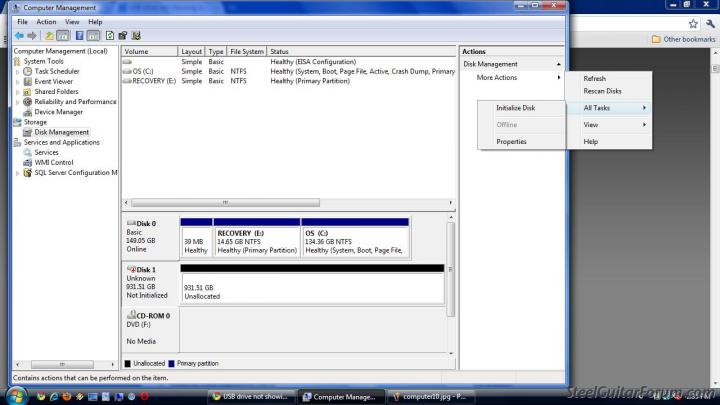
This is what I got when I first clicked on Disk Management. I have seen this before and the "unknown. disk is the USB drive.
After I clicked on More Tasks:
Notice that under "More Tasks", there is no CHANGE DRIVE LETTER AND PATHS. From here a new window will appear. It will say “ALLOW ACCESS TO THIS VOLUME BY USING THE FOLLOWING DRIVE LETTER AND PATHS:” Just "initialize Disk" and "properties".
I'll try your other suggestions now.
EDIT: The method you suggested takes me to the same place the article did with the same results.
And for kicks, I clicked on the "initialize disk" option, and it says I have to initialize the disk before I can access it and asks to select what kind of boot partition to use.
Carter D10 8p/7k, Dekley S10 3p/4k C6 setup, Regal RD40 Dobro (D tuning), Recording King Professional Dobro (G tuning), NV400, NV112, Ibanez Gio guitar, Epiphone SG Special (open G slide and regular G tuning guitar) .
Maybe somebody here can see what's wrong in those pictures.
Some day before you reformat your USB drive (which might not help) you, it would be interesting to try your USB drive on somebody else's computer.
You could also try booting your computer from a Linux Live CD (that you make) or flash drive to see if that can read your USB drive. That's easier than it sounds, and would not make any changes to your Vista computer.
I know. My head is about to explode. At the same time I am dealing with this, I am having to learn 3 hours of real rock & roll in 2 days. Songs I have never played before and some I never even heard before. Too much for this old brain to deal with at one time.
I can have a friend try the drive on his computer tomorrow and see if it can be accessed.
How do I create a bootable linux or flash drive? I do have a flash drive I can use, but no blank disks or CD's.
Carter D10 8p/7k, Dekley S10 3p/4k C6 setup, Regal RD40 Dobro (D tuning), Recording King Professional Dobro (G tuning), NV400, NV112, Ibanez Gio guitar, Epiphone SG Special (open G slide and regular G tuning guitar) .
Y'know, I've always owned at least 2 steel guitars, like one for the bus or club and one for home, and I've found it indispensable. Same deal with computers; you need at least 2, especially if you're using Windoze. Saves a lot of time and grief in the long run.
Thanks Cal. I do have two computers, but with things as they are with me right now, the desktop (my main axe, so to speak) is in storage. I have to be mobile right now and that big ole Dell Tower is too hard to move around.
Carter D10 8p/7k, Dekley S10 3p/4k C6 setup, Regal RD40 Dobro (D tuning), Recording King Professional Dobro (G tuning), NV400, NV112, Ibanez Gio guitar, Epiphone SG Special (open G slide and regular G tuning guitar) .







 )
)